
By Wataru Otsubo — Cross Shore LLC. Tested 25 August 2026. Japan Readiness Score: 42 / 100.
Verdict
MeetGeek is a well-built meeting assistant that I would not put in front of a Japanese client.
The parts around the transcription are good, and in places better than good. The bot joined my Google Meet on its own, on time, with no action from me. The interface is clear. The integration catalogue is broad. The free tier includes API access, which is unusual.
The Japanese is where it fails, and it fails in three specific ways.
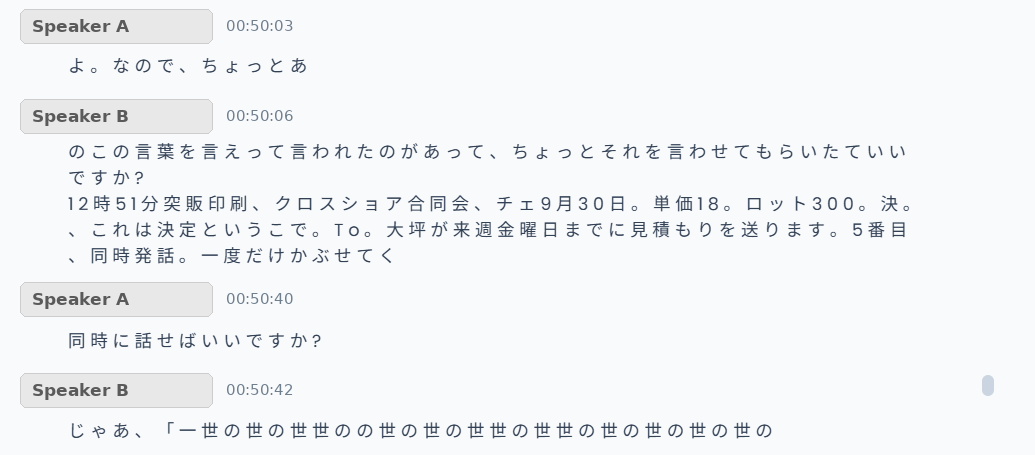
It breaks the text. In a 61-minute Japanese meeting, with the meeting language explicitly set to Japanese (Japan), 97.7% of the Japanese characters came back with a space inserted after them.
It drops digits from numbers. I read out a unit price of ¥180 and a lot quantity of 3,000 units. The transcript records 18 and 300. Both lost a digit and both lost their unit. Neither looks wrong on the page.
It invents commitments. I planted an action item with a named owner and a deadline. MeetGeek transcribed it perfectly — and then left it out of the summary’s “Next Steps” entirely, while adding two action items that were never discussed.
Of nine things I deliberately planted in that meeting, two came through correctly. Zero reached the summary.
Score: 42 / 100. Not ready for Japanese business meetings.
What is MeetGeek?
MeetGeek is an AI meeting assistant. A bot joins your video call, records it, transcribes it, and produces a summary with action items, highlights and searchable notes. It connects to your calendar and can join every meeting automatically without being invited each time.
It competes with Otter.ai, Fireflies.ai, tl;dv, and the note-taking now built into Zoom and Google Meet themselves. It advertises transcription in over 100 languages. Japanese is one of them.
That claim is what this review tests.
How I tested it
Two tests, same day, both in Japanese, both with native Japanese speakers.
Test 1 — casual, in person, ~5 minutes. Two speakers in one room, recorded through the MeetGeek mobile app, language left on Auto-detect. Unstructured conversation.
Test 2 — real business meeting, 61 minutes, Google Meet. Two native Japanese speakers on built-in laptop microphones, one in Thailand and one in Japan. The MeetGeek Notetaker joined automatically via the Google Calendar integration. The meeting language was explicitly set to Japanese (Japan) before the call — I set it deliberately, to rule out language auto-detection as the cause of what I saw in Test 1.
Partway through Test 2 I read out a short prepared script, verbatim. It contained nine items:
- Three proper nouns — a printing company, my own company’s legal name, and the city I live in
- Three numbers — a date, a unit price, and a lot quantity
- One explicit decision — the Japanese phrase you use to close a point
- One action item — who owes what, to whom, by when
- One deliberate overlap — we talked over each other, once
Nine items is a small sample, but it is a controlled one. I know exactly what went in, so I can say exactly what came out.
The other participant knew the meeting was recorded and agreed in advance. Nothing in this review reproduces the content of that meeting. Every screenshot is cropped and masked to show only how the tool broke, never what we discussed. Speaker names are replaced with Speaker A and Speaker B.
For the transcription analysis I did not eyeball it. I pulled the full transcript — 535 segments, 16,726 Japanese characters — and counted.
Setup experience in Japan
This is the strongest part of the product.
I connected Google Calendar, set external meetings to “join all”, and did nothing else. When the meeting started, the Notetaker appeared in the Meet room by itself. That is exactly what you want from this category of tool, and plenty of competitors make you work harder for it.
Two things to know before relying on it.
The bot is late. The first captured speech in my 61-minute meeting is at 00:01:03. Roughly the first minute is simply not in the transcript. If your meetings open with the decision and then move to small talk, you lose the decision.
The bot is visible. Everyone in the room can see a recording bot has joined. That is honest behaviour and I prefer it, but in a Japanese business context it means consent has to be handled before the call, not during it. In practice you want a standing rule about which meetings the Notetaker may enter, because “join all” means join all.
Japanese UI support
The web interface is English. Effectively all of it.
There is a language setting, but it is not the one most people are looking for. The interface language and the recording language are two different settings, and the recording language is the one that determines output quality. The mobile app has a Language setting with Auto-detect; on the web, the meeting language lives elsewhere. Working out which control did what took me longer than it should have.
If you are comfortable in English this is a non-issue. If you are handing this to a Japanese colleague who is not, it is a barrier standing in front of the part that is actually broken.
Japanese transcription test
The controlled test: 2 correct out of 9
| What I said | What MeetGeek wrote | |
|---|---|---|
| 凸版印刷 — Toppan, a major Japanese printing company | 突販印刷 — a homophone that means nothing | ✗ |
| クロスショア合同会社 — Cross Shore LLC | クロスショア合同会 — 社 dropped; no longer a company name | ✗ |
| チェンマイ — Chiang Mai | チェ — truncated to two characters | ✗ |
| 9月30日 — 30 September | 9月30日 | ✓ |
| 単価180円 — unit price ¥180 | 単価18 — a digit and the yen unit gone | ✗ |
| ロット3000個 — lot of 3,000 units | ロット300 — a digit and the counter gone | ✗ |
| じゃあこれは決定ということで — “so, that’s decided” | 決。、これは決定というこで — mangled, but 決定 survived | △ |
| 大坪が来週金曜までに見積もりを送ります — Otsubo will send the quote by Friday next week | 大坪が来週金曜日までに見積もりを送ります | ✓ |
| (deliberate overlapping speech, once) | 「世の」repeated for ~28 seconds | ✗ |
Two of nine fully correct. All three proper nouns failed.
The numbers are the dangerous part
Look again at the two numbers that failed.
¥180 became 18. Three thousand units became three hundred. Both lost exactly one digit, and both lost the unit that would have flagged the loss.
A garbled number is safe, because you can see it is garbled. 18 and 300 are not garbled. They are clean, plausible, order-of-magnitude-wrong figures sitting in a document that looks like a record of what was agreed. In a quotation, that is a factor-of-100 error in the total, and nothing in the transcript tells you to check.
I spent close to two decades in production management at a Japanese printing company before starting Cross Shore. Unit price and lot quantity are the two numbers you never get wrong. This is the single finding in this review that would stop me deploying MeetGeek in a Japanese company, independent of everything else below.
The spacing problem
In Test 1, every Japanese character came back separated by a space. 「何ですか?」 rendered as 「何 で す か ?」. I assumed Auto-detect was to blame.
It was not. In Test 2, with the meeting language explicitly set to Japanese (Japan), it happened again. Measured across the whole transcript: of 16,726 Japanese characters, 97.7% were followed by an inserted space.
This is not cosmetic. Japanese does not use spaces between words. Text broken this way cannot be pasted into a document, cannot be searched reliably, and reads to a Japanese speaker roughly the way T h i s s e n t e n c e reads to you.
Proper nouns
The product could not spell its own name. Across the transcript “MeetGeek” appears as MeetGeek, etGeek, MetGek and eetGek — four renderings.
Beyond the scripted test, ordinary business vocabulary drifted into unrelated words: 講座化 (turning something into a course) became 口座化 (turning something into a bank account); 時給 (hourly rate) became 自給 (self-sufficiency). “ChatGPT” became 「チャットJPT」; “Claude Code” became “Cloud Code”.
Most telling: the same person’s name was transcribed two different wrong ways within forty seconds. There is no name memory across a single conversation.
Overlapping speech
We talked over each other once, deliberately, for about thirty seconds. The transcript for that stretch contains one word, 「世の」, repeated over and over, split across both speakers, and nothing else. Not a partial capture. Not a garbled sentence. A loop.
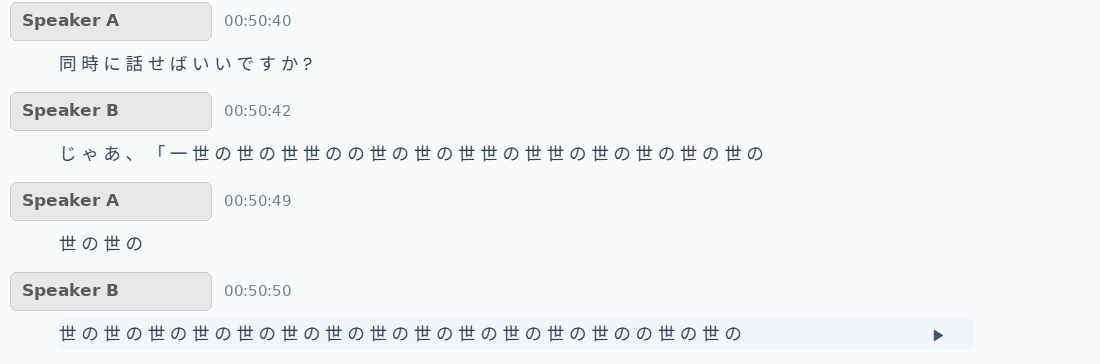
If you have sat in a Japanese meeting you know how much of it is 相槌 — short overlapping acknowledgements while the other person is still speaking. This is not an exotic edge case. It is how the conversation is held together.
What it got right
For anyone deciding whether to wait for the next version, this matters: the transcript captured a date correctly, and captured a complete deadline-bearing sentence — owner, deadline, deliverable — perfectly.
The recognition underneath is not hopeless. The layers built on top of it are.
Speaker identification
MeetGeek correctly identified two speakers and named them from the calendar invite. Then it assigned the words to them almost at random.
Over 61 minutes with two people, the transcript records 447 speaker changes — roughly 7.5 per minute. Of those, 160 (35.8%) hand fewer than seven characters to the other speaker, meaning the switch lands mid-word.
In practice:
Speaker A: …is it all right if it isn’t a hair clipp—
Speaker B: —er?
The offset alone is bad. Worse, it is not always a clean offset. Near the end of the meeting a question and its answer were both attributed to the same person; I only know which is which because the answer names the other participant.
With two people this is survivable, because context lets you reconstruct it. Put four people in the room and the transcript stops being evidence of anything.
AI summary quality
This is where I stop advising caution and start advising against.
The summary looks excellent. 2,821 characters of fluent Japanese, organised into an overview, eight action items with named owners and timestamps, AI insights and grouped topic highlights. It reads like something a competent person wrote.
None of the nine planted items reached it. I searched the full summary text for each one — the company names, the city, the date, the price, the quantity, the decision, the action item. Every one: zero occurrences.
The last of those deserves its own sentence. The action item — 大坪が来週金曜までに見積もりを送ります, transcribed flawlessly, with a named owner, a deadline and a deliverable — did not appear in the summary’s “Next Steps”. It is the single most summarisable sentence in a sixty-one-minute meeting, and it was captured correctly, and it was discarded.
Then it invented two. Two of the eight generated “next steps” describe commitments that were never made. One turns something I had already done into a task I still owe. The other turns a description of what a piece of software can do into a promise to report metrics at the next meeting. Both carry my name as owner. Both carry a timestamp linking to a moment in the recording where, if you check, no such commitment exists.

It also carried its own misspelling forward: the summary calls the product “MetGek”.
I want to be precise about why this is the most serious finding here. It is not that the summariser is imprecise. It is that on the one axis that matters — what was decided and who owes what — it discarded everything real and produced two things that were not.
A transcript that is visibly broken is safe, because nobody trusts it. A summary that is fluent, confident, correctly formatted and partly fabricated is dangerous, because the only way to catch the fabrication is to read the entire transcript it was supposed to save you from reading.
One detail I find almost funny: the summary itself records that both participants raised Japanese transcription accuracy as a priority problem. It got that part right.
Integrations
The catalogue is genuinely strong — 25 applications:
Google Calendar, Outlook Calendar, Google Drive, OneDrive, Dropbox, Zapier, Make, n8n, Public API, Slack, Notion, Confluence, Trello, Asana, Monday, Jira, ClickUp, HubSpot, Salesforce, Pipedrive, Zoho CRM, Affinity, Attio, Close and WhatsApp.
Recording works with Zoom, Google Meet and Teams, on the free plan.
For the Japanese market there is a hole in it. Chatwork, LINE WORKS, kintone, Backlog, Sansan, Garoon — none are there. If your company runs on Chatwork, as a great many Japanese SMEs do, MeetGeek does not connect to where your team actually talks. Zapier, Make and n8n could bridge that, but they start at Pro, so there is no free path to test it.
Pricing
| Plan | Price | Transcription | Storage |
|---|---|---|---|
| Basic | $0 | 3 hours / month | 3 months transcript, 1 month audio |
| Pro | $9.99 /user/month | 20 hours / month | 1 year transcript, 6 months audio |
| Business | $17 /user/month | Unlimited | Unlimited transcript, 12 months video |
| Enterprise | Custom | Unlimited | Custom |
Annual billing takes 40% off. Non-profits and education get 30%.
Two notes for Japanese buyers.
Pricing is in US dollars only. I found no yen pricing and no currency selector.
I could not verify Japanese invoicing. Whether MeetGeek issues a qualified invoice under Japan’s invoice system (適格請求書), and how consumption tax is handled, is not visible from a free account, and I will not guess. If you are buying for a Japanese company, ask them directly. I have not tested this and I make no claim either way.
One practical point. The free tier is 3 hours a month. My two tests — five minutes and sixty-one minutes — left 1.9 of 3 hours remaining. One weekly hour-long meeting exhausts the free plan in three weeks. That is not enough runway to evaluate Japanese properly before you have to pay.
Japan Readiness Score
| Criterion | Weight | Score |
|---|---|---|
| Japanese Language Performance | 25 | 6 |
| Setup & Onboarding | 15 | 9 |
| Core Product Usability | 15 | 9 |
| AI Output Quality | 15 | 3 |
| Integrations | 10 | 7 |
| Japanese Business Fit | 10 | 3 |
| Pricing & Billing | 5 | 3 |
| Beginner Friendliness | 5 | 2 |
| Total | 100 | 42 |
Language performance is not lower because the hardest item in the controlled test — a full sentence carrying owner, deadline and deliverable — came through perfectly. The recognition engine has something in it.
AI output quality is 3 of 15 because the structure works and the substance does not: nine planted items, zero surfaced, two fabricated.
Usability scores well on its own merits and then cannot deliver, because what it is displaying is broken.
Our full scoring method is on the Testing Method page.
Pros
- The Notetaker joins automatically and reliably. Zero effort once connected.
- Zoom, Google Meet and Teams recording on the free plan.
- API and MCP access on the free plan — unusual and genuinely useful.
- 25 integrations, including Zapier, Make and n8n from Pro.
- Clear, fast interface with timestamped playback, search, highlights and sharing.
- Honest about recording: the bot is visible to everyone in the room.
- Cheap. $9.99 and $17 per user are not the reason to walk away.
- The raw recognition can handle a complex Japanese sentence correctly when nobody overlaps.
Cons
- Numbers lost digits: ¥180 became 18, and 3,000 units became 300 — with the units stripped, so neither looks wrong.
- All three proper nouns in the controlled test failed, including a company’s legal name.
- 97.7% of Japanese characters returned with an inserted space, with the language explicitly set to Japanese.
- Overlapping speech produced one repeated word for roughly thirty seconds.
- Speaker attribution broke in 35.8% of 447 speaker changes, mid-word.
- Zero of nine planted items reached the AI summary — including one transcribed perfectly.
- The AI summary fabricated two action items and attributed them to a named owner.
- The product misspelled its own name four different ways.
- Roughly the first minute of the meeting was not captured.
- No Japanese-market integrations at all.
- USD-only pricing; Japanese invoicing unverified.
- The 3-hour free tier is too small to evaluate Japanese properly.
Who should use it
English-language teams. Nothing here is evidence about MeetGeek’s English performance, which I have not tested. If you work in English, judge it on its own merits — the surrounding product is good.
Japanese teams who need a searchable index, not a summary. If what you want is “find me the moment we discussed the delivery date”, the timestamps work and the search works, and you can click through and listen. The transcript is a good index even when it is a bad document.
Solo users and small teams on a budget. At $0 to $9.99 with API access included, it is worth keeping an eye on.
Who should avoid it
Anyone producing 議事録 that will circulate inside a Japanese company. The output has to be rewritten from the audio, which removes the reason for using it.
Anyone whose meetings involve prices, quantities or specifications. This is the sharpest one. The numbers do not come back wrong-looking. They come back wrong.
Any meeting where decisions and deadlines matter. Mine were in the transcript. None were in the summary.
Meetings with more than two or three participants. Speaker attribution is already unreliable with two.
Any team that would act on the summary without checking it. The failure mode is not a summary that looks wrong. It is a summary that looks right.
Companies that need a qualified Japanese invoice. Confirm before you buy.
Final verdict
42 / 100 — Not ready for Japanese business meetings.
This is not a bad product. It is a good product with an unfinished Japanese layer, sold into a market where “supports 100+ languages” is doing a lot of quiet work.
The gap is specific, and worth naming precisely, because some of it looks fixable. The character spacing is a text-processing bug, not a recognition failure — the engine underneath captured a complex sentence perfectly. Overlapping speech and speaker attribution are harder problems.
But two findings are not about Japanese at all. Dropping a digit from a spoken number, and generating action items nobody committed to, are failures that would matter in any language. Japanese is simply where they became visible, because the degraded transcript gave the summariser more gaps to fill.
I will test it again when the spacing is fixed, because if that one thing changes, much of this review changes with it. Until then, if the numbers in your meetings matter, this tool cannot be trusted to carry them.
Limitations of this test
Two meetings is two meetings. Both used built-in laptop microphones — realistic, not ideal. Both had exactly two speakers. The scripted block was nine items read once; a larger controlled set would give a firmer error rate. I tested on the free plan, which excludes high-quality video recording, though it uses the same transcription engine. I have not tested MeetGeek in English, and nothing here should be read as evidence about its English performance.
If MeetGeek would like to respond to any of this, or point out something I set up wrong, get in touch and I will re-test and update this page with the result.
Cross Shore Tools tests software from a Japanese business perspective. We buy or use the free tiers of what we review, we publish what we measured, and we do not raise a score because a product pays a commission. See our Affiliate Disclosure. This review is not sponsored and contains no affiliate link to MeetGeek at the time of publication.